If somebody like the post and its helpful in your work then, add comments.

Sunday, January 20, 2013

Link for “Sign in as Different User” in SharePoint 2013

It’s think the developer team of the SharePoint 2013 forget to add the  “Sign in as a Different User” menu command in SharePoint 2013 Smile

No worry’s we can add that using the below steps(on premise)

  1. Open the Welcome.ascx from “C:\Program Files\Common Files\Microsoft Shared\Web Server Extensions\15\TEMPLATE\CONTROLTEMPLATES”
  2. Find the “<SharePoint:MenuItemTemplate runat="server" id="ID_RequestAccess"”.
  3. Press enter and add
  4. <SharePoint:MenuItemTemplate runat="server" ID="ID_LoginAsDifferentUser"
    Text="<%$Resources:wss,personalactions_loginasdifferentuser%>"
    Description="<%$Resources:wss,personalactions_loginasdifferentuserdescription%>"
    MenuGroupId="100"
    Sequence="100"
    UseShortId="true"
    />

  5. Save the welcome.ascx

Now you can see that “Sign in as Different User” appears at drop down.


Signin


Enjoy SP 2013

Monday, December 17, 2012

Visual Studio 2012 Project Load Failure Dialog Box for Database Project

Upon loading Visual Studio 2012 RC or Visual Studio 2010, several package load failure messages are shown for SSDT components.

The ‘SqlStudio Editor Package’ package did not load correctly.

Trying to build solution that contains a sql database project (VS 2012 RC). Other projects build fine but database project fails. Error log shows:

C:\Program Files (x86)\MSBuild\Microsoft\VisualStudio\v11.0\SSDT\Microsoft.Data.Tools.Schema.SqlTasks.targets(386,5): error MSB4061: The "SqlModelResolutionTask" task could not be instantiated from "C:\Program Files (x86)\Microsoft SQL Server\110\DAC\Bin\Microsoft.Data.Tools.Schema.Tasks.Sql.11.dll".  [C:\a\src\Gamma.Db\Gamma.Db.sqlproj]

SQL Server Data Tools (SSDT) : SQL Server Data Tools (SSDT) transforms database development by introducing a ubiquitous, declarative model that spans all the phases of database development and maintenance/update inside Visual Studio. You can use SSDT Transact-SQL design capabilities to build, debug, maintain, and refactor databases. You can work with a database project, or directly with a connected database instance on or off-premise.

Resolution : Install SQL Server Data Tools (SSDT) in the system and restart the machine

Link to download : http://msdn.microsoft.com/en-us/jj650015

Friday, November 2, 2012

SharePoint 2010 error when trying to delete a managed account: An object in the SharePoint administrative framework, SPManagedAccount Name=managed-account could not be deleted because other objects depend on it. Update all of these dependants to point to null or different objects and retry this operation.

After deleting a User profile Service Application, we may want to clear up the corresponding managed account that we have created for the Service Application.

But we get the above error when we try to deleted the acount from CA-> Securtiy->Configure Managed Accounts.

To resolve this error, we have to use SharePoint PowerShell,

Steps :

  1. Go to Start->Microsoft SharePoint 2010 Products->SharePoint 2010 Management Shell
  2. Paste this commend on the shell “Get-SPServiceApplicationPool” (get a list of the Service Application Pools)
  3.            App
  4. The run the following cmdlet “Remove-SPServiceApplicationPool” and press enter key.
  5. The the service application pool and press enter
  6.          App1
  7. Remove the Managed account via PowerShell by following cmdlets
  8. Get-SPManagedAccount
    Remove-SPManagedAccoun <accounetname>

Monday, October 29, 2012

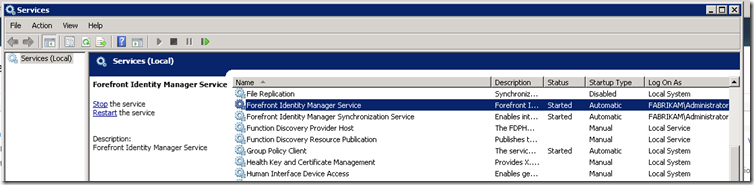
The forefront identity manager service service on local computer started and then stopped : SharePoint 2010 user profile issue

When we create user profile service application, then some times the User profile Synchronization services does start or run. The common scenarios the farm admin and domain admin are same. So, user profile synchronization does not run under the same account. From my research or we can say finding, when we do new installation of the SharePoint in new server, most of the time the service does not run, we just wait for long hours, and it stat is like starting. Seriously it wasted my lot of time, just sitting at my screen and waiting to start.

The main reason of the that is, we have create a new service account say “sp_userprofiles” in managed account of the Active Directory section.

AdUser

And give the following permissions.

Permisson

Now we have create one Delegate Control for created user.

DelegateControl

Click on Next

On the Users or Groups page, click Add

Type the name of the synchronization account (farikam\sp_userprofiles), and then click OK.

DelegationControl

On the Tasks to Delegate page, select create a custom task to delegate, and then click Next.

DelegationControl1

On the Active Directory Object Type page, select This folder, existing objects in this folder, and creation of new objects in this folder, and then click Next.

DelegationControl2

On the Permissions page, in the Permissions box, Select Replicating Directory Changes (select Replicate Directory Changes on Windows Server 2003), and then click Next.

DelegationControl3

Click Finish.

DelegationControl4

Create User profile Service Application.

Run the services from Central Admin(User Profile Service and User Profile Synchronization Service )

DelegationControl5

Check the services.msc in the system

DelegationControl6

Both service are now running(Do not run or edit the properties of the service manually)

Enjoy SharePoint Smile

Tuesday, January 31, 2012

SharePoint 2010 : Types of Event Receivers

List Events -
Adding/ed a new list field.
Updating/ed a field.
List Item Events -
Adding/ed a new list item or document.
Document checking/ed in or out.
Adding/ed an attachment.
Deleting/ed an item or document.
List Email Events -
A list received an email.
Web Events -
Deleting/ed a site collection or site.
Creating/ed a new site collection or sub site.
Feature Events -
Feature activating/ed or deactivating/ed.
List Workflow Events -
A workflow is starting/ed, postponed, or completed.

Monday, November 7, 2011

SharePoint 2010 : Enhancements for Developers in SharePoint Foundation


Enhancement

Benefit

Service application architecture

Redesigned infrastructure to facilitate sharing of resources across Web applications and farms.

Windows PowerShell support New support and capabilities for writing administrative scripts.
Feature versioning and upgrade New support for versioning and upgrading features.

SharePoint Developer Tools for Visual Studio 2010

A first-class development experience for SharePoint developers (finally).

Sandboxed solutions

New support for deploying solution packages at site collection scope in a sandboxed environment.

New features for throttling lists and controlling
query execution

Enhanced support for stabilizing the farm by prohibiting large,inefficient queries.

New events for sites, lists, and workflows

Additional events for developers to hook up event handlers.
LINQ to SharePoint provider

New support for writing LINQ query statements to access SharePoint list data.

REST-based access to SharePoint list items

New support for accessing SharePoint list data from across the network using REST-based Web service calls.

Client-side object model

Ability to leverage the SharePoint object model from across the network when programming with .NET, Silverlight, and JavaScript

Enhanced support for integrating Silverlight applications

Rich support for deploying and versioning Silverlight applications within a SharePoint environment

Claims-based security

New authentication support for leveraging external identity management systems and extending access control in SharePoint sites using custom claims

Business Connectivity Services (BCS) and external lists

New support for creating read-write connections to back-end databases and line-of-business systems and exposing their data as lists within SharePoint sites

NET Assembly Connectors for BCS

Support for creating a custom component to integrate any data source with the BCS.

Wednesday, November 2, 2011

SharePoint 2010 : Programmatically Add a Term to The SharePoint 2010 Term Store.

The new metadata features in 2010 are of great value to us. With each of our assets having a unique accounting identifier and our document contributors having room for improvement with naming documents favorably for search it could be a life savor!

Add following reference to the solution

using System.Globalization;
using Microsoft.SharePoint;
using Microsoft.SharePoint.Taxonomy;
 
To add term in the term store, add following code


SPSite site = new SPSite("http://newdemo2010");
TaxonomySession taxSession = new TaxonomySession(site);
TermStore termStore = taxSession.TermStores["Managed Metadata Service"];
Group storeGroup = termStore.Groups["BPTemplate"];
TermSet termSet = storeGroup.TermSets["Timecard"];

termSet.CreateTerm(pTerm, 1033); //It will term to the root term

Term propertyIdsTerm = termSet.Terms["TimeLog"];
propertyIdsTerm.CreateTerm(pTerm, CultureInfo.CurrentCulture.LCID); //This
will add term to a term
termStore.CommitAll();
wd

Tuesday, October 4, 2011

SharePoint 2010 : Add video on Blog Post template

Open the blog site on which we want to show the YouTube video in SPD. Add below script at last of the master page before body tag.

<script type="text/javascript">
<!--
for (var i = 0; i < document.getElementsByTagName('*').length; ++i)
{if (document.getElementsByTagName('*')[i].id.indexOf('youtube') == 0)
{//get the parameters

var tagtoadd= document.getElementsByTagName('*')[i].innerHTML.split(',');
//create the string
var finalstring = '<object width="';
finalstring += tagtoadd[0];
finalstring += '" height="';
finalstring += tagtoadd[1];
finalstring += '"><param name="movie" value="';
finalstring += tagtoadd[2];
finalstring += '" /><param name="allowFullScreen" value="';
finalstring += tagtoadd[3];
finalstring += '" /><embed src="';
finalstring += tagtoadd[2];
finalstring += '" type="application/x-shockwave-flash" allowfullscreen="';
finalstring += tagtoadd[3];
finalstring += '" width="';
finalstring += tagtoadd[0];
finalstring += '" height="';
finalstring += tagtoadd[1];
finalstring += '" /></object>"';
//replace it
document.getElementsByTagName('*')[i].innerHTML = finalstring ;
}
}
//—>
</script>

Edit the post and add following tag in the html of the post body. The tag should be in below format.(<div align="center" id="youtubeSNBS1">425,355,http://www.youtube.com/v/7SGp9pA9cAY;&amp;hl=en;&amp;fs=1,true</div>

)


image


Publish the post and see the effect.


IE

image

Chrome


image


Firefox

image

It works for all the browsers.

Thursday, July 21, 2011

SharePoint 2010 : Import List workflow in your custom solution

When you have to import the workflow in your solution, like for Sandbox solution. So, how you will be importing that list workflow in the VS 2010 sandbox solution. Many of us find like import reusable workflow in the VS 2010 solution. But what about the list workflows. And suppose if their is more then one workflow. I have also search lot on this topic and does not get not much help.

Solution Smile!!!!!!!!!!!!!!

To import List workflow on the VS solution. Create a WSP of the Site and import using the VS template  for SharePoint. Now Copy the ListInstances(On which list workflow are created),Modules of the workflow and WorkflowAssociations folders in our custom solution. Now build the solution. It will give some errors of workflow. So over come the errors add reference of following references

  • microsoft.sharepoint.WorkflowActions
  • System.Workflow.Activities
  • System.Workflow.Runtime

It will resolve the some of the errors. Now it will be giving the XOML errors. So to overcome these errors,you have add the same line of the tag from “importsolution.csproj” file to “customsolution.csproj”. Make it similar as import solution.

The changes should be done for workflow.xoml, workflow.xoml.wfconfig.xml and workflow.xoml.rules for all the workflow which are associated with all the list in the WSP. Now all the error will resolved. Deploy the solution and test. The workflow will work fine.

It will help in creation and deployment for the sandbox and SPD workflow. Comment if any help needed.

SharePoint 2010 : Creating a Web/Site template

What Are Web Templates in general?
We can a web site template is a pre-designed web page or simply a web page without or with basic contents. Right?

What is web template in the SharePoint term?
Web templates on the other hand, are stored in the database, and are created using an existing site, with or without its specific content, as a model. This provides a means for reusing sites that you have customized.

In SharePoint 2007/2010 the meaning is same for both the version. But creating a web template is now different in the both version, means approach is different.
Like in MOSS we can create the web template using the existing site, SPD 2007 for UI and WSP for deployment. But in the SharePoint now you can create your Custom Web template using the SharePoint existing site. Well, for the custom template first you have to design and implement all the requirement on the existing site, and save the template in the Site templates. But here is the slightly change, we can create two types of the site template solution,
Farm
Sandbox
In VS 2010 their is a new template for the creating the solution from existing WSP is Import SharePoint Solution Package.

Import SharePoint Solution Package

Now you can import your WSP in this solution and you can write your custom code or now you can modify UI etc. It will give great help when you are creating a sandbox solution and does not want to write a code. then just deploy all the solution on existing site and use that site WSP to import in this solution. Extract your required solution from it and implement in the your solution.